A HubSpot base degrades naturally: an order of magnitude commonly quoted in the industry puts between 20 and 30% of B2B data going stale every year, a figure this audit does not measure itself (job changes, email changes, company changes). Without maintenance, your CRM turns into a graveyard of records you pay for every month. Here is the complete method to assess the state of your base, clean it, and keep it clean.
What a dirty base costs you every month
A dirty base costs you in three ways. HubSpot bills per marketing contact, so every dead record stays a line on your invoice. Invalid addresses damage your sender reputation, and it is your real messages that end up in spam. And the hour a rep spends on a wrong number is an hour not spent prospecting.
The 5 indicators of a healthy base
To assess the state of a base objectively, measure these five axes:
- Completeness: what percentage of the essential fields (email, phone, company, owner) is filled in?
- Consistency: does the data contradict itself? (activity dates earlier than creation dates, lifecycle stages incompatible with statuses)
- Normalisation: are the formats uniform? Phones in international format, consistent dates, countries written a single way.
- Duplicates: how many people exist in several copies? (See my complete guide on HubSpot duplicates.)
- CRM conformity: does every record have an owner and a lead status? Without these two fields your pipeline is not steerable, a lead with no owner is worked by nobody.
The step by step method
1. Export and back up
Full export of the contacts with all useful properties. This copy is also your backup before any change.
2. Segment by temperature
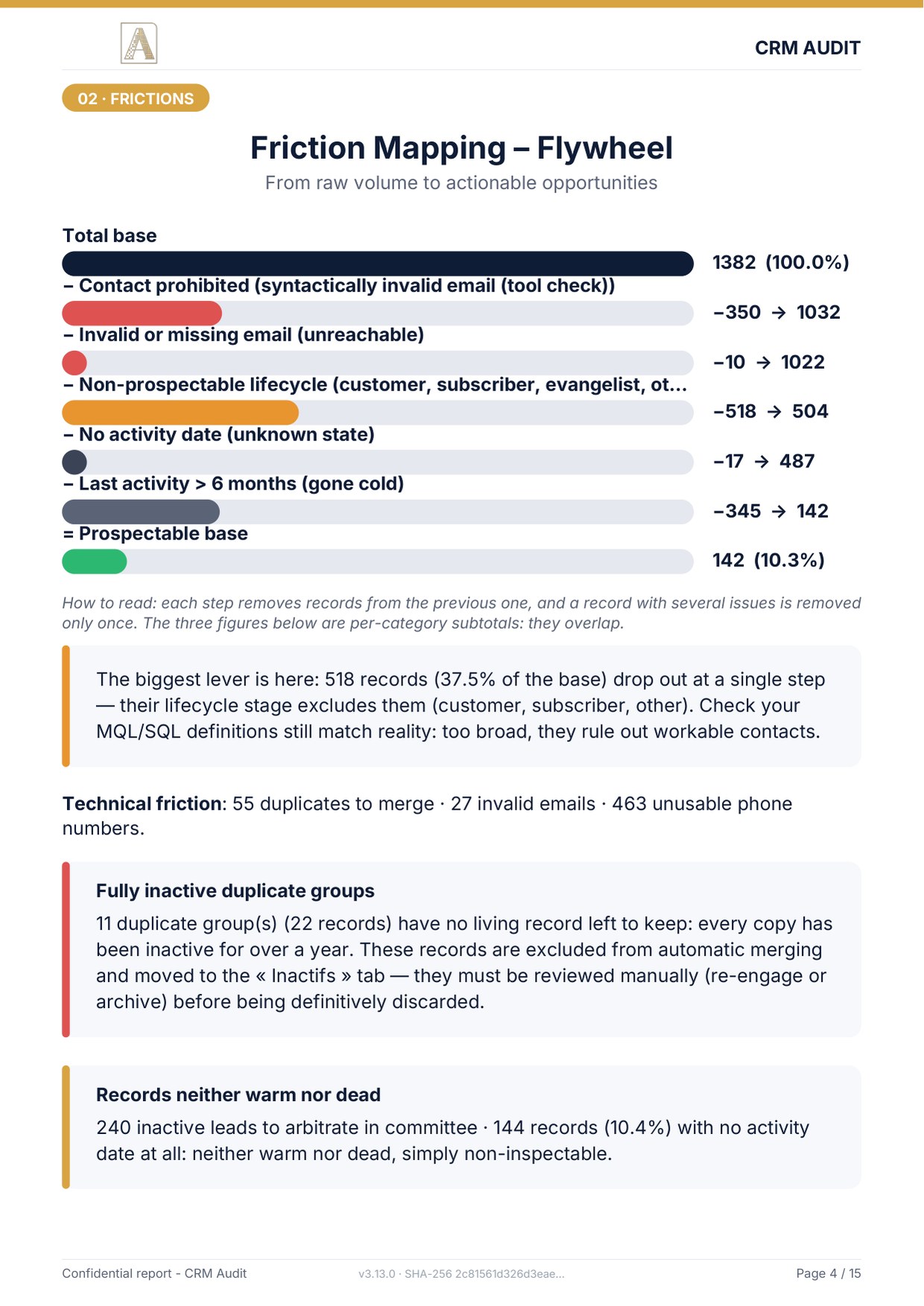
Sort each record by its last activity: hot (under 3 months), warm (3 to 6 months), cold (6 to 12 months), dead (over 12 months), and, the often forgotten category, no date: records with no recorded activity at all, neither hot nor dead, simply not assessable. They require human arbitration.
3. Handle the unreachable
Invalid or missing email means unreachable contact, to fix or archive. Phones: normalise everything to international E.164 format and flag the invalid ones for enrichment.
4. Deduplicate
Detect duplicate groups, choose the record to keep according to explicit rules (activity history, completeness, owner), merge while tracing every decision.
5. Reassign the orphans
Every active lead must have an owner. Split the orphans among the reps and set the rule: no record created without an owner (a HubSpot workflow can enforce it).
6. Arbitrate dead leads as a team
Do not delete 600 records alone: a quick sales and marketing review decides between re-engagement, archiving, and deletion. Fifteen minutes a week is enough once the big cleanup is done.
7. Reimport carefully
Update mode with Record ID, workflows paused, test on a small batch first. The details are in my guide to HubSpot import errors.
Do it yourself or delegate?
Up to a few hundred contacts, this method is doable in house, count one to two days of careful work. Beyond that, or if the base has never been cleaned, automation becomes essential: crossing 5 indicators on thousands of rows, tracing every merge and producing compliant reimport files cannot reasonably be done by hand.
That is exactly what the full audit does: a PDF report with a score out of 100, an Excel workbook where every decision is traced and can be validated, and import ready CSV files. The whole thing is processed offline, after a drop on a server hosted in France: your customer file is seen by one provider only, which matters when you are talking about the most sensitive data your company holds.
Sources
Every page below has been opened and read. These are primary sources: the authority that sets the rule, or the software vendor.
- Create segmentsHubSpot Knowledge Base. Active and static segments, and what separates them.
- Use data quality toolsHubSpot Knowledge Base. The data quality overview: duplicates and formatting. In beta, and subject to your subscription.
What is your base health score?
The free mini-audit answers within 24h: score out of 100, truly prospectable rate, duplicates and orphan leads. No commitment, from a simple export.
Get my free mini-audit