Your open rates are dropping, recipients tell you "I got nothing", and your campaigns seem to speak into the void. Before blaming your subject lines or your content, look at your base: in most cases, degraded deliverability is a list problem, not a writing one.
How mailbox providers judge you
Gmail, Outlook and the others assign each sender a reputation, built continuously from measurable signals: the hard bounce rate (non existent addresses, the most destructive signal), spam complaints, the engagement rate (recipients who never open your emails for months indicate a bought or stale list), and the presence of spam traps: old addresses reactivated by providers precisely to catch senders who do not maintain their lists.
The direct link with the state of your base
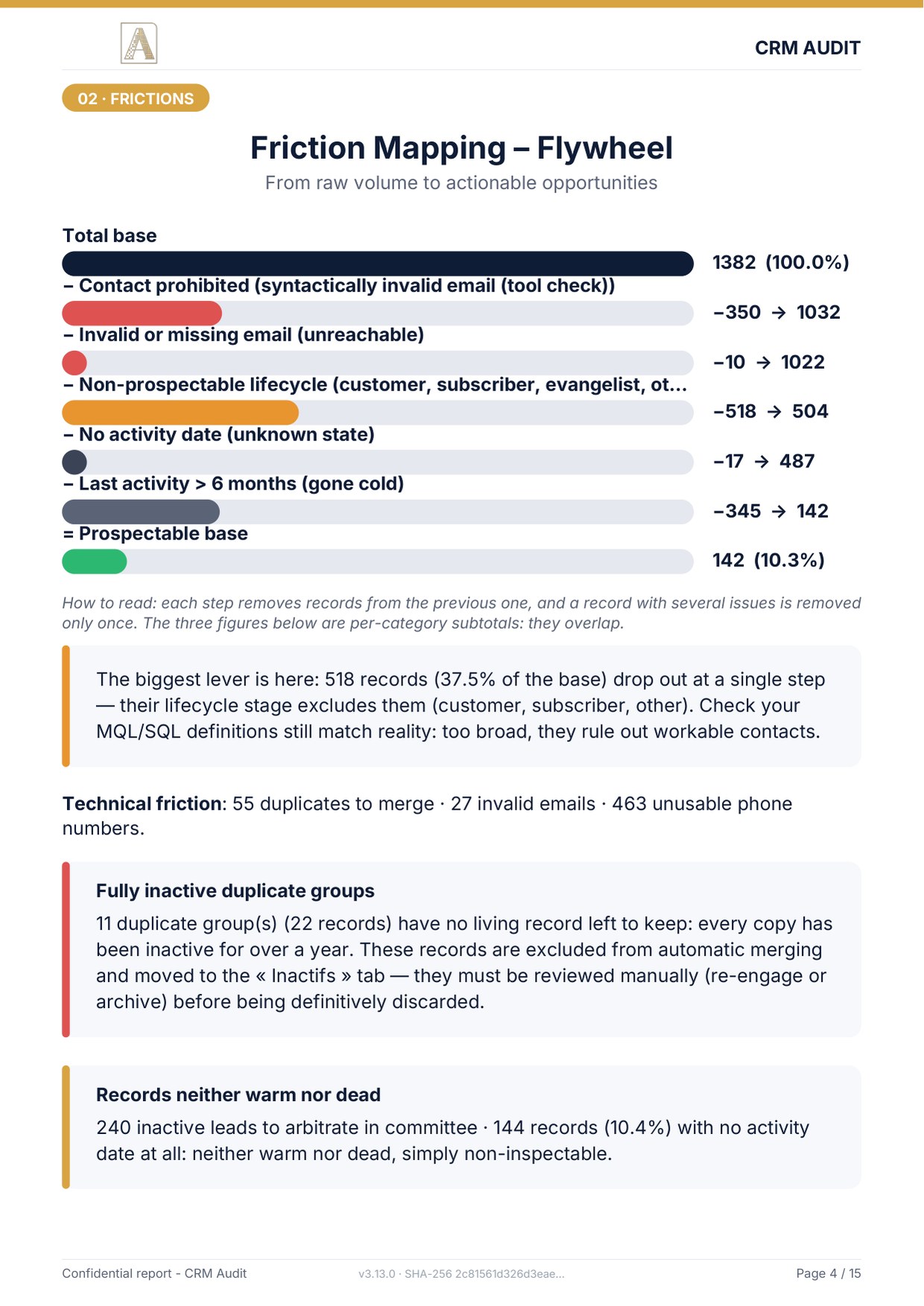
Each category of dirty record translates into a negative signal: invalid or mistyped emails generate bounces at every campaign; records inactive for over a year drag down your engagement rate; duplicates send the same message twice to the same person, the shortest route to the "spam" button.
The sanitising method
- Export and audit your base (see my export guide): spot syntactically invalid addresses, misspelled domains ("gmial.com", "outlok.com") and empty email fields.
- Fix or blank: an obvious typo can be fixed; a doubtful address should be blanked rather than generating a bounce. Never guess an address.
- Segment by engagement: exclude from your regular sends any contact with no interaction for 6 to 12 months. HubSpot handles this natively through low engagement contact lists.
- Try a single re-engagement: a dedicated "do you still want to hear from us?" campaign to the inactive. Those who do not react leave the marketing list, for good.
- Handle duplicates before any major campaign (full method in my duplicates guide).
The permanent safeguards
- Double opt-in on your forms: a confirmed address never bounces on entry.
- Automatic removal of hard bounces: HubSpot flags these addresses; check that no send list brings them back in.
- Regular audit: the industry commonly quotes a decay of 20 to 30% a year for B2B data, an order of magnitude this audit does not measure. A list clean today will no longer be in eighteen months without maintenance.
A smaller, clean list consistently outperforms a large dirty one: better rates, better reputation, and a lighter HubSpot invoice, I detail that last point in my cost of a dirty base calculation.
Sources
Every page below has been opened and read. These are primary sources: the authority that sets the rule, or the software vendor.
- La prospection commerciale par courrier électronique, SMS-MMS et automate d’appelCNIL, the French regulator. In French. What makes a send lawful, before any technical deliverability question.
- Create segmentsHubSpot Knowledge Base. To isolate in a segment the addresses degrading your reputation.
How many risky addresses in your list?
The free mini-audit detects your invalid emails and dead records within 24h, the two first enemies of your deliverability. A simple export is enough, analysed offline.
Get my free mini-audit