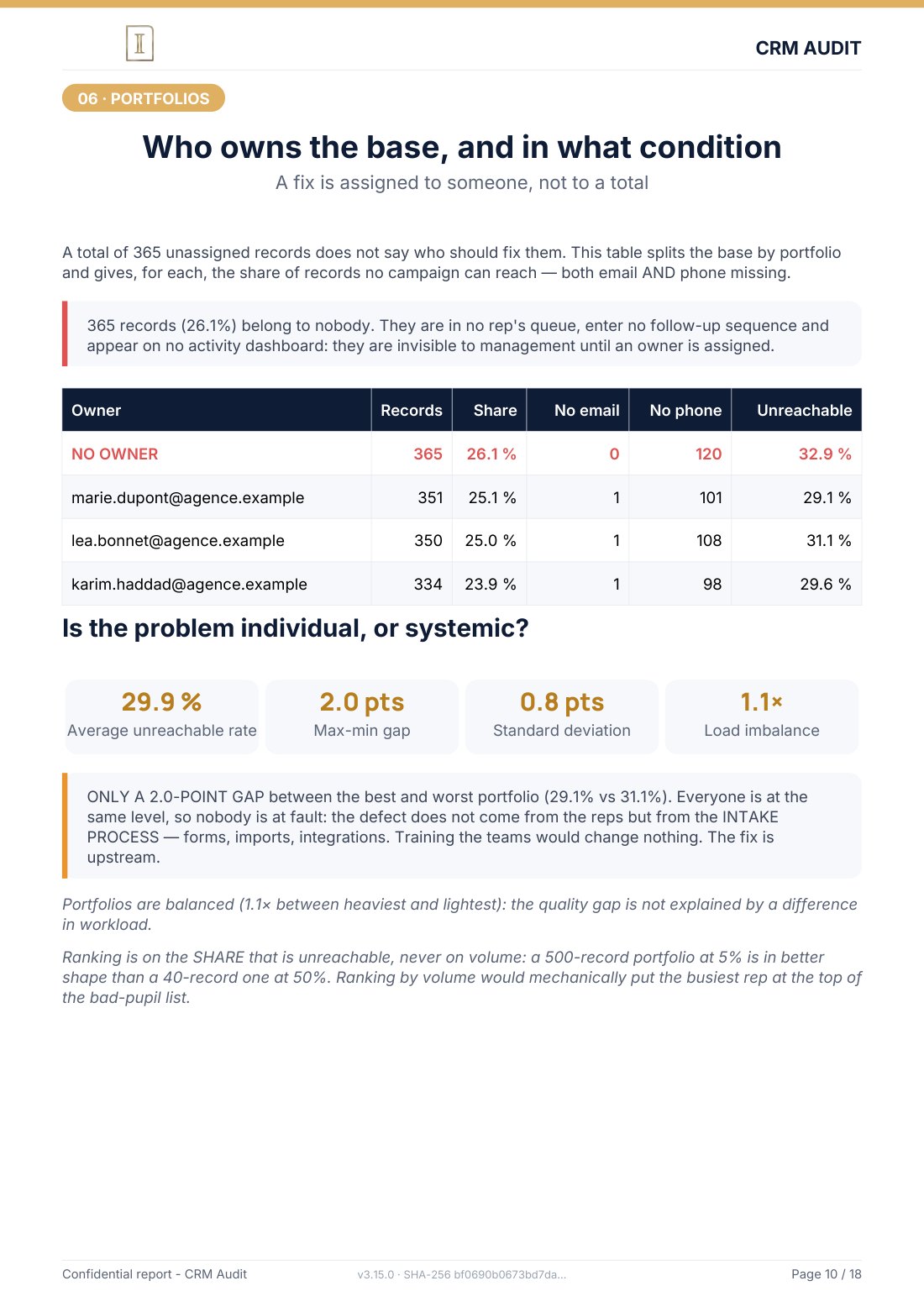
On the 1,400 contact demonstration base, entirely synthetic, 365 records, over 26%, had no owner. A lead with no owner is a prospect no one is responsible for: no one follows up, no one qualifies, no one accounts for its fate. It is in your CRM, you pay for it, and it exists for nobody. Here is how to fix the problem, then stop it coming back.
Why it is more serious than it looks
The "Contact owner" field is not an administrative formality. It drives three vital mechanisms: accountability (who must act on this lead, within what deadline); reporting (per rep dashboards ignore records with no owner, so your real pipeline is underestimated); and automation (follow up or notification workflows that rely on the owner simply do not fire).
In revenue operations, the rule is simple: if an action is not recorded and assigned in the CRM, it did not happen. A base full of orphans is not inspectable: neither sales effort nor future revenue can be measured on records nobody works.
Where do orphans come from?
- Imports: a file imported without an owner column creates unassigned records in bulk, this is the number one cause.
- Forms and integrations: with no automatic assignment rule, every new inbound lead is born an orphan.
- Departures: when a rep leaves the team and their contacts are not reassigned, hundreds of records become orphans at once.
Detect and reassign
- Create a filtered view: Contacts, then filter "Contact owner", then "is unknown". You now have your complete list of orphans.
- Sort before reassigning: no point distributing dead records. Cross with the last activity date, an active orphan is reassigned first, an orphan inactive for 18 months belongs to archiving instead (see my complete cleaning method).
- Reassign in coherent batches: by territory, by company size, by source, not at random. Multiple selection, then "Assign" in HubSpot.
- Tell the reps: a silent reassignment is useless. Each recipient must know what they receive and why.
Stop them coming back
Three safeguards to put in place once and for all:
- Automatic assignment workflow: any new contact with no owner is assigned according to your rules (rotation, territory, source) within minutes of creation.
- Import discipline: anyone importing a file must include the owner column, add this rule to your HubSpot import checklist.
- Departure ritual: the day a rep leaves, their contacts are reassigned, the same day, not "later".
Sources
Every page below has been opened and read. These are primary sources: the authority that sets the rule, or the software vendor.
- Create segmentsHubSpot Knowledge Base. Building the segment of records whose owner is empty.
- Create and edit propertiesHubSpot Knowledge Base. The owner property and its setup.
How many orphan leads in your base?
The free mini-audit gives you the exact figure within 24h, with the overall health score of your base. No access to your portal: a simple export is enough, analysed offline.
Get my free mini-audit